¶ Use the fiber and CO₂ parameter libraries
A library row is not a magic setting. Fiber and CO₂ are separate libraries. The row only works if the source, nozzle, focus, gas, and pressure at the head match what that row assumes.
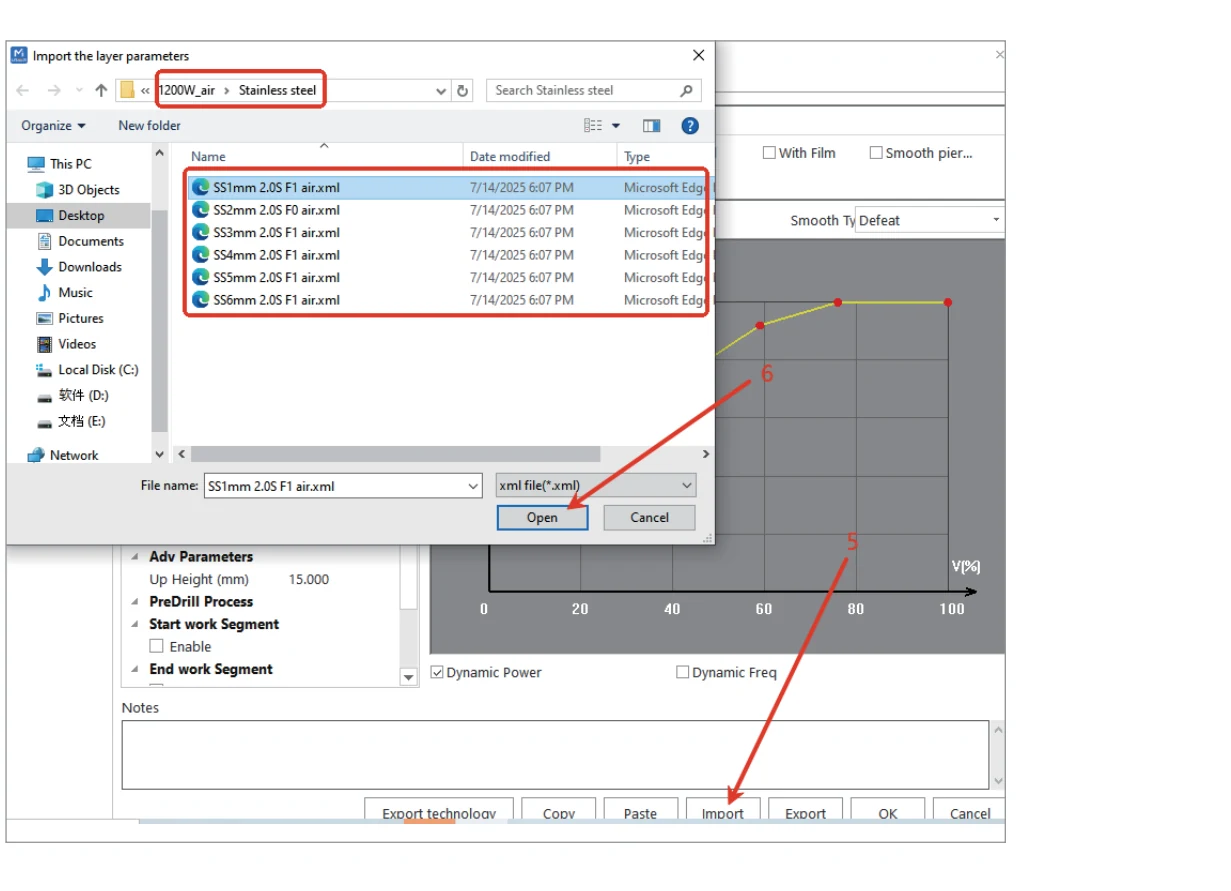
¶ Fiber library (what the video is doing)
- Select fiber cutting mode.
- Import the cutting file, then open Layer → Import and choose a row from the USB/library.
- Read the row name before pressing Start. Factory labels typically encode stainless (
SS) or other material, thickness, nozzle (for example a 2.0 single), focus code (F0= focus at the surface in that library), and gas (N2/O2/AIR). - Confirm the same nozzle is actually in the head and that the selected gas valve is open.
If the coupon is carbon steel 3 mm or thicker, Gweike’s published CNC parameter article says the process changes as a set: oxygen, a double-layer nozzle, and a large positive focus. Importing a thin-sheet nitrogen row and then “adding power” is how people blow nozzles.
¶ CO₂ library (what the video is doing)
- Focus the CO₂ head with the supplied focusing tool, not a fiber focus value.
- Start the extraction fan, chiller, and CO₂ enable in that order. The tube must show continuous water without bubbles before emission.
- Switch mLaser to CO₂ mode, import the drawing, and assign the green/first layer to engraving if that is the factory convention on your build — other colours cut.
- Import CO₂ cutting parameters for the actual material. Simulate, frame, then cut.
¶ Stop conditions
- The library row’s gas does not match the cylinder and regulator in use.
- Head pressure is unknown. Gweike’s published figures are at the cutting head, not at the bottle. Long hoses drop pressure.
- The source (fiber vs CO₂) in software is not the source on the gantry.
- Any cooling, door, FTC, or source alarm.
Official starting-point tables (CNC gantry only, not handheld): Gweike M-Series 800 W / 1200 W cutting parameters. Those numbers are a factory starting point, not a guarantee for your shop air, worn nozzle, or alloy.
See cut quality if the imported row still fails a coupon.
¶ Official Gweike walkthrough
Cutting different materials is picking a library row that matches metal, thickness, nozzle, focus code, and gas — then proving it on scrap.