¶ Rotary cutting with fiber or CO₂
Start with the material and the source your machine is documented to use for it. Fiber and CO₂ are not interchangeable labels in a dropdown. The head, focus, gas, settings, and safe materials have to match.
¶ Prepare the part
Identify material, wall thickness, diameter/section, coating, seam, and desired datum. Long or heavy work needs correctly aligned support so it cannot whip, sag, slide, or overload the chuck. Isolate energy, secure the part, remove the chuck key, and rotate by hand to check runout and full clearance.
For non-round tube, use only the rotary method/configuration supported by the machine and software. A simple circumference calculation does not describe corners and changing radius.
¶ Configure motion
- Back up the original flat-table machine/axis parameters.
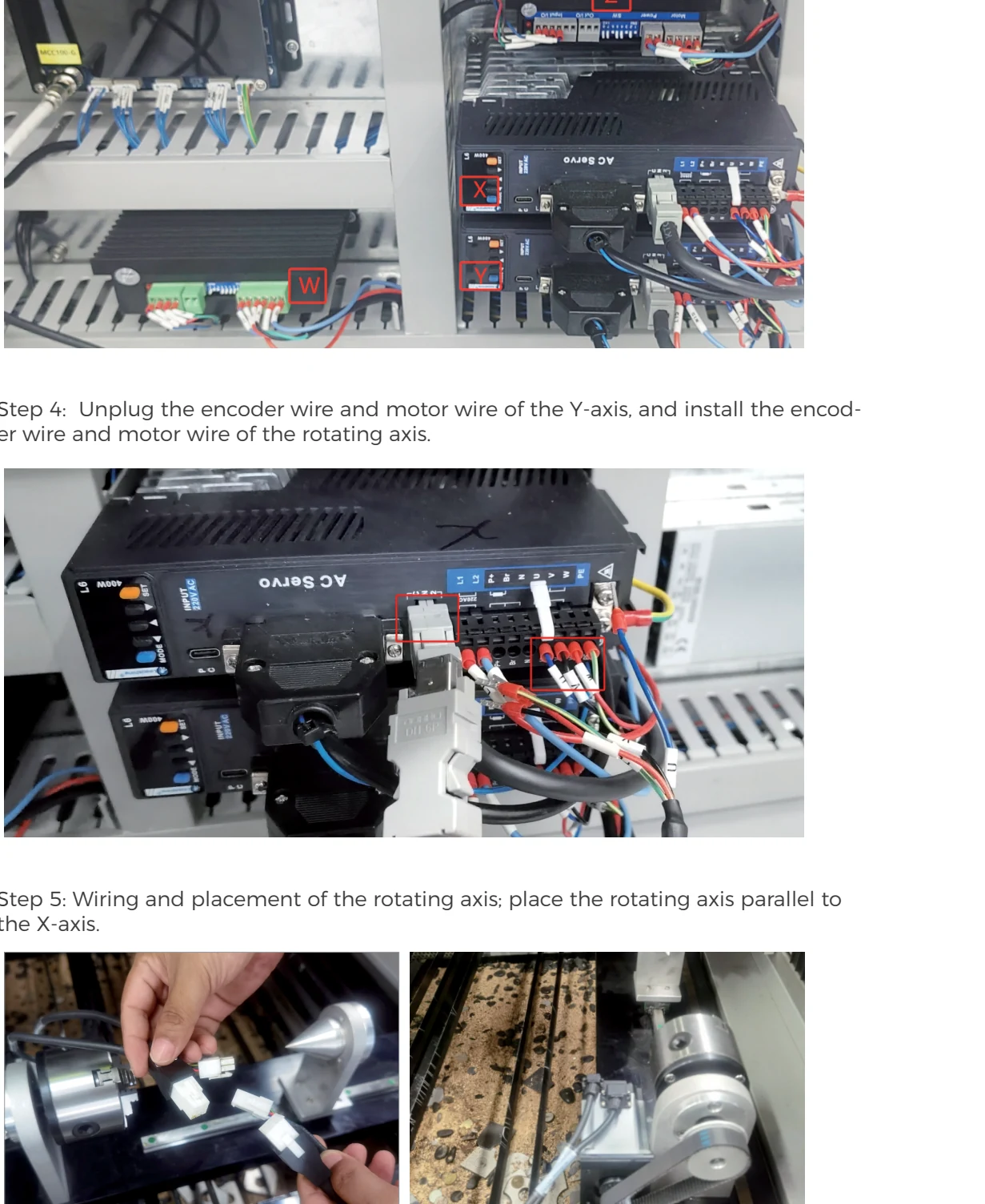
- Connect the rotary to the documented controller port with energy isolated.
- Select or import the correct Gweike rotary configuration for the fitted unit.
- Enter the verified diameter/lead/ratio information as required by that software version. See calculate rotary lead.
- Jog slowly and verify direction, response, and no cable wind-up.
- Check one known rotation/circumference before enabling laser output.
¶ Prepare and prove the job
Unwrap/map the geometry using the mLaser workflow supported for rotary cutting. Verify units, seam/origin, inside/outside order, and that offcuts cannot jam or strike the head. Apply a verified fiber or CO₂ process for the actual material/wall, head, gas, and source.
Simulate the entire route. With output disabled, rotate/jog through the envelope at low speed while watching chuck jaws, supports, seam, hoses, head, and protruding features. Confirm focus/height procedure for the curved surface; do not assume a flat-sheet FTC calibration alone proves it.
¶ First test
Cut a low-consequence feature away from the final part end. Supervise continuously. Stop for stock slip, oscillation, abnormal chuck load, axis mismatch, head contact, hot offcuts entering equipment, fire, source/gas/cooling alarm, or unsafe reflection.
Measure the feature in both axial and circumferential directions. A circumferential scale error points to diameter/lead/ratio or slip; an axial error belongs to the linear axis/drawing layer.
¶ Restore the flat bed
When finished, isolate energy, remove the part/rotary safely, reconnect only the documented interfaces, restore the saved flat-bed parameters, verify direction and travel with output disabled, recalibrate the CNC head, and run a small flat coupon. Do not assume disconnecting the rotary restored software values.
¶ Official Gweike walkthroughs
These are Gweike's own walkthroughs. Keep the checks above and watch both clips. Then prove the setup and motion on your machine with output disabled.
32. Rotary-axis installation
Rotary install: chuck the tube, park the unused head high, swap the documented axis motor/encoder leads for the rotary, place the axis parallel to the required machine axis, then calculate lead from π·D·gear ratio and restore the original XML before a normal home.
33. Rotary-axis operation
Rotary operation: drawing width is circumference, length is tube length; frame the whole wrap; do not home Y the old way after the lead change.