¶ Calculate rotary lead and restore the axes
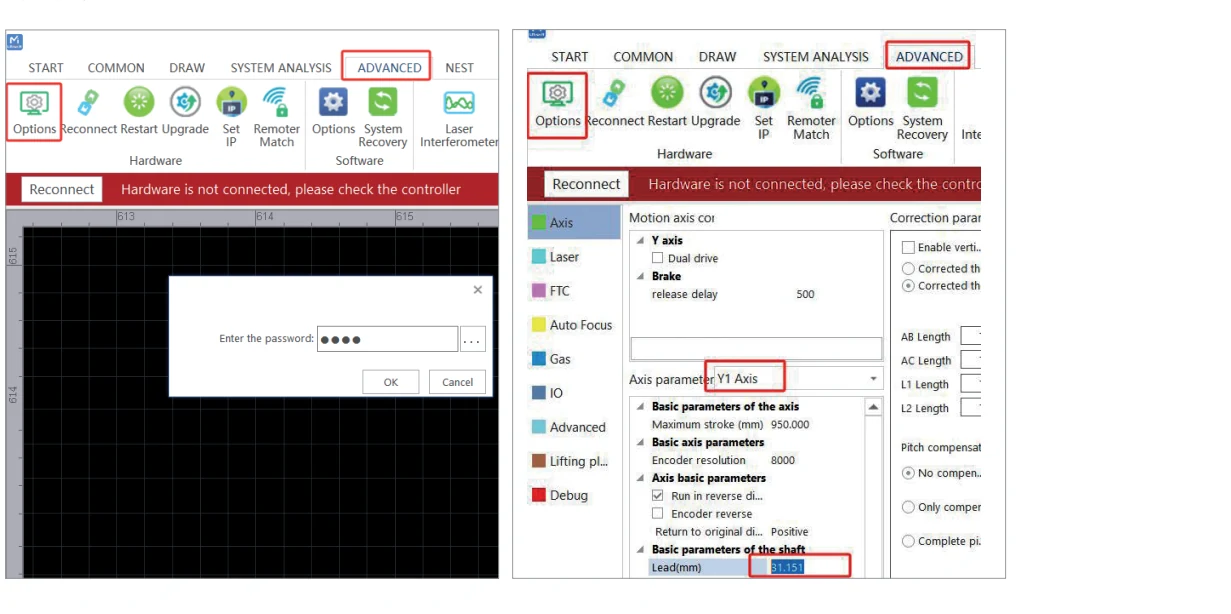
Measure the part before entering rotary lead. Do not copy the number from a screenshot. The M-Series manual uses:
lead = π × measured workpiece diameter × applicable gear ratio
Lead connects the configured rotary motion to travel around the surface. The manual shows 26/48 for its example hardware. Check the supplied rotary and its documented ratio; those tooth counts are not a setting for every chuck.
¶ First-pass calculation
For a round part:
- Measure diameter at the actual processing band, preferably in several orientations.
- Compute circumference:
π × diameter. - Multiply by the gear ratio required by the specific Gweike rotary configuration.
- Enter the value only in the documented rotary lead/axis field after saving the original parameter.
Example of the calculation structure only: a measured diameter D with the manual-demonstrated ratio would use π × D × (26/48). This is not a default for all chucks or controllers.
¶ Verify without laser output
Mark a fine reference line on the stationary part and fixture. Command the known rotary travel that should equal one circumference/revolution under the configured workflow. The mark should return to its reference without slip. Repeat in the same direction and then test reversal to expose backlash.
If a commanded circumferential length C produces a measured surface length M, a useful diagnostic correction relationship is:
new lead = current lead × C / M
Use it only after ruling out wrong units, diameter, ratio, axis mapping, and physical slip. Confirm the control's definition before changing a machine parameter.
¶ Error patterns
- Constant percentage error: diameter/lead/ratio or unit setting.
- Correct at one band, wrong elsewhere: taper or changing effective diameter.
- Different result on repeats: stock/chuck slip, coupling/mechanical issue, or measurement method.
- Gap/overlap at a full-wrap seam: circumference mapping plus process start/stop behavior.
- Wrong orientation only: axis direction/mapping, not lead.
¶ Restore the flat-bed configuration
- Disable laser output and isolate energy for hardware changes.
- Remove/support work and disconnect the rotary only as documented.
- Reconnect the original axis hardware and inspect every cable/connector.
- Import or re-enter the dated known-good flat-bed backup—not values recalled from memory.
- With output disabled, verify axis identity, direction, home/reference behavior, travel limits, and displayed coordinates at reduced speed.
- Restore the CNC head/source/process mode and run FTC calibration.
- Simulate and frame a small flat test, then cut a measured coupon.
If an axis moves in an unexpected direction or distance, stop immediately. Do not swap wires or disable limits to make it home.
¶ Official Gweike walkthrough
Advanced rotary: lead, axis assignment, and restoring the cutting platform. Wrong lead prints the wrong circumference. Always re-import the original platform file before ordinary sheet work.